Common VideoBuddy Problems and How to Fix Them
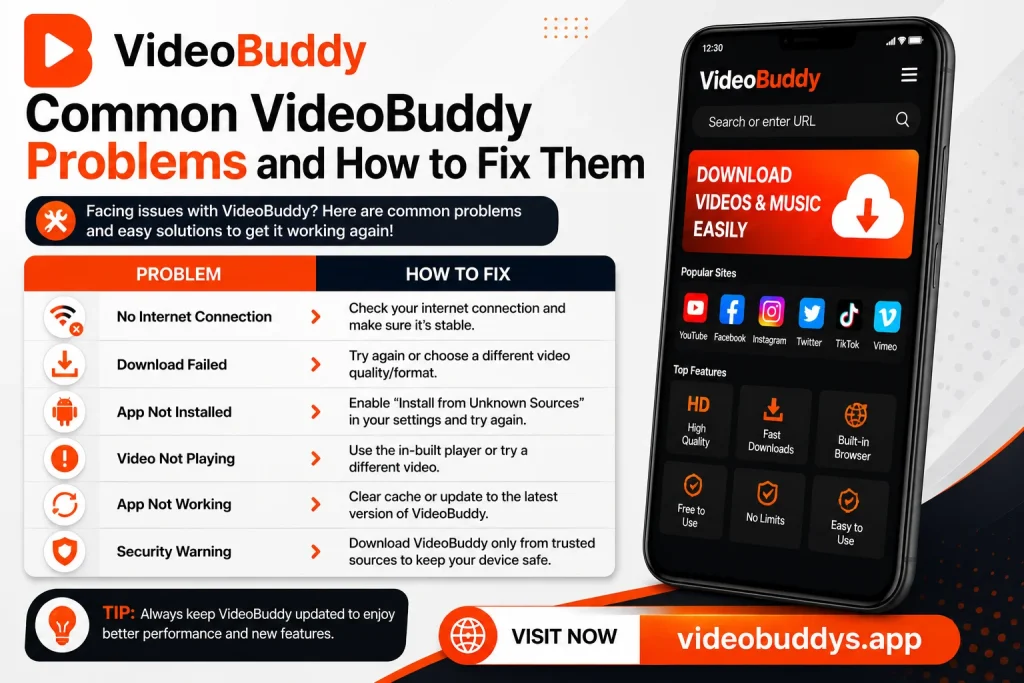
Even the most reliable apps run into occasional issues, and VideoBuddy is no exception. Many users search for quick solutions when something does not work as expected. This guide covers the most common problems people face and explains simple ways to fix them.
Why Problems Happen in the First Place
Most issues with downloader apps are not serious and usually come from small, fixable causes. Outdated app versions, unstable internet connections, or limited storage space are often the main reasons behind these problems. Understanding the cause makes finding a solution much easier.
Instead of panicking over an error, taking a moment to identify the actual issue usually leads to a quick fix.
Most Frequently Reported Issues
Here is a quick list of problems users commonly report:
- App crashing unexpectedly
- Videos failing to download
- Slow download speeds
- Installation errors
- Videos not playing after download
Addressing each of these separately makes troubleshooting much simpler.
Problem 1: App Crashing Frequently
One of the most common complaints involves the app crashing during use. This usually happens due to outdated versions, insufficient storage, or too many background apps running at once. Restarting the phone and closing unnecessary apps often resolves this issue quickly.
How to Fix Frequent Crashing
Below is a simple table showing possible causes and matching solutions.
| Cause | Solution |
|---|---|
| Outdated app version | Update to the latest version |
| Low storage space | Clear unnecessary files |
| Too many background apps | Close unused applications |
| Corrupted app data | Clear app cache and restart |
Trying these steps in order usually solves crashing issues without needing to reinstall the app.
Problem 2: Videos Failing to Download
Sometimes downloads fail to start or stop midway without any clear reason. This can happen due to weak internet connections, server issues from the video source, or insufficient storage space. Checking these factors first often reveals the actual cause quickly.
Here is a simple checklist to troubleshoot failed downloads:
- Check your internet connection stability.
- Confirm there is enough storage space available.
- Restart the app and try downloading again.
- Try a different video to rule out source-specific issues.
- Update the app if it has not been updated recently.
Following these steps in order usually resolves most download failures.
Problem 3: Slow Download Speeds
Slow downloads can be frustrating, especially for larger or higher-quality videos. This issue is often linked to weak Wi-Fi signals, network congestion, or server load on the video’s original platform. Switching to a stronger connection or trying again later can often improve speed significantly.
Tips to Improve Download Speed
- Connect to a stronger and more stable Wi-Fi network.
- Avoid downloading during peak internet usage hours.
- Close other apps or devices using the same network.
- Choose a slightly lower quality if speed is a priority.
These small adjustments can make a noticeable difference in download performance.
Problem 4: Installation Errors
Installation problems are common, especially since the app sometimes requires manual setup through APK files. Errors often occur due to blocked permissions, corrupted files, or insufficient storage space. Rechecking these settings usually solves the issue without much difficulty.
| Error Type | Likely Fix |
|---|---|
| Blocked by security settings | Enable unknown sources permission |
| Corrupted APK file | Redownload from a trusted source |
| Insufficient storage | Free up space and retry |
| Installation stuck | Restart the phone and try again |
Working through this table step by step usually resolves most installation-related issues.
Problem 5: Videos Not Playing After Download
Occasionally, a downloaded video may fail to play properly, even though the download appeared successful. This can happen due to format compatibility issues or incomplete downloads caused by interrupted internet connections. Redownloading the video or checking the file format often solves this problem.
Steps to Fix Playback Issues
- Confirm the download completed fully without interruption.
- Try playing the video using a different media player.
- Redownload the video if the file seems incomplete.
- Update the app to ensure compatibility with newer formats.
Most playback issues are resolved by simply ensuring the download finished correctly the first time.
General Maintenance Tips to Avoid Future Problems
Beyond fixing specific issues, a few general habits help prevent problems from happening in the first place. Keeping the app updated regularly ensures bug fixes and improvements are applied automatically. Periodically clearing cache and unnecessary files also keeps the app running smoothly over time.
Here is a simple maintenance checklist:
- Update the app whenever a new version is available.
- Clear cache files every few weeks.
- Avoid installing from unverified sources.
- Restart the app occasionally to refresh performance.
Following these habits reduces the likelihood of running into repeated issues.
When to Reinstall the App Completely
If problems continue even after trying basic fixes, reinstalling the app completely is often the most effective solution. This clears out any corrupted data that simple troubleshooting might have missed. Downloading a fresh copy from a trusted source ensures a clean and stable installation.
For readers who want detailed troubleshooting guides for similar apps, VIDEOBUDDYS.APP provides clear explanations to help resolve common issues quickly. It is a helpful resource for anyone dealing with persistent app problems.
Final Thoughts
Most problems users face with VideoBuddy have simple, straightforward solutions once the actual cause is identified. Whether it is crashing, failed downloads, or installation errors, following the right troubleshooting steps usually resolves the issue quickly. Keeping the app updated and practicing good maintenance habits also helps prevent future problems.
For more troubleshooting guides and helpful app tips, VIDEOBUDDYS.APP remains a reliable resource to check whenever something does not work as expected.